

The TTC launches real-time information screen pilot project
Finding your way on many surface routes is about to get easier! As of Thursday, May 21, 2026, the TTC is piloting 75 real-time information screens at high-demand bus stops, streetcar stops and select stations. These screens will display real-time information relevant to the stop to help customers plan and navigate their journeys during the busy summer season.
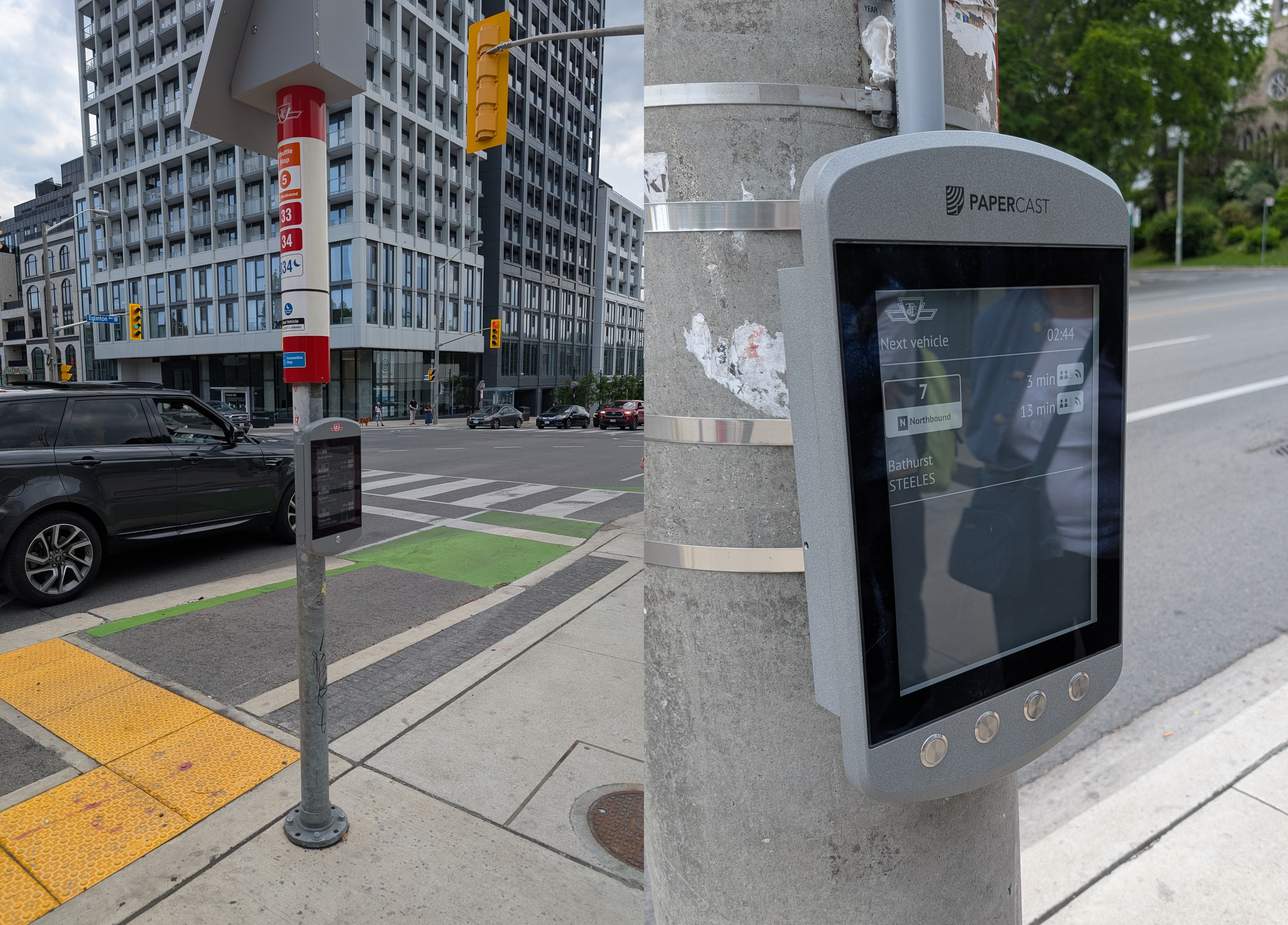
Here is what you need to know:
- Screen installation rolled out over the course of several weeks starting Thursday, May 21, 2026, and are now active at nearly all locations.
- Screens display next vehicle arrivals and service alerts plus route changes and diversions for easy trip planning.
- Screens include text-to-speech audio announcements and high-contrast displays that can be read in bright sunlight and low-light conditions.
- Units are solar- or battery-powered and can be installed at stops without access to electricity.
- The pilot will run for a minimum of six months, and customers can share feedback or report a damaged/non-working screen to TTC Customer Service.
Frequently Asked Questions
-
Why is the TTC piloting real-time information screens?
As part of the TTC’s Wayfinding Strategy, the TTC is piloting 75 new real-time information screens to improve customer experience, particularly at bus and streetcar stops. The goal is to make more real-time information available to customers ahead of a busy summer travel period which includes Toronto hosting six matches during FIFA World Cup 2026™.
-
What are the screens?
The TTC is installing real-time information displays at select stops and outside select stations. The screens use ePaper technology, which is designed to be easy to read in bright sunlight and low-light conditions using high-contrast screens. These units are solar- or battery-powered, so they can be installed at locations without access to electricity.
-
What information will the screens show?
The screens will provide real-time, dynamic customer information, including:
- Next vehicle arrival times
- Service alerts
- Route changes and diversions
-
Where will the screens be located?
Screens will be installed at high-demand bus and streetcar stops and outside select stations across the city. Installation will occur over several weeks, so customers may start seeing screens appear in some locations before others as the rollout progresses. The TTC will provide more information on specific locations as it becomes available.
-
There is a screen on my bus/streetcar/station stop pole but it is not displaying anything. Why is that the case?
Screens are being installed over several weeks, and units may be in place before they are activated. Installation started on Thursday, May 21, 2026, and screens will begin going live in early June, with more screens becoming active as the rollout continues.
-
Why isn’t there a screen on my bus/streetcar/station stop pole?
This is a pilot project, and screens are only being installed at a limited number of locations to test the technology. Stops were selected based on several factors, with the overall aim of testing the screens in high-demand locations under a variety of conditions.
-
What accessibility features do the screens have?
The screens have high-contrast displays to support readability in different lighting and text-to-speech functionality for customers who rely on auditory information.
-
How long is the pilot, and what happens after it ends?
The pilot will run for a minimum of six months with installation rollout starting Thursday, May 21, 2026. After the pilot, the TTC will review performance and customer feedback to determine next steps.
-
How can I share feedback about this pilot?
To share feedback or concerns and report issues with screens, please contact TTC Customer Service and include the stop intersection and date/time of the issue, if possible.